Answers to the things people ask most about subscriptions, billing, privacy, and the app.
Is there a free version?+
LiveNori is a paid subscription product — there’s no permanently free tier. Yearly plans include 1 month free so you can try the full app before being charged. See pricing.
Where am I billed — through LiveNori or Apple?+
All subscriptions are billed by Apple through the App Store on iOS. You start your subscription inside the LiveNori iOS app. Your Apple ID is the source of truth for billing, renewals, and refunds.
How does the free trial work?+
Yearly and Family Yearly plans include 1 month free when you subscribe inside the iOS app. You won’t be charged until the trial ends. Cancel anytime during the trial in Settings → Apple ID → Subscriptions and you won’t be charged.
How do I cancel my subscription?+
Subscriptions are managed by Apple, not in the app.
iPhone / iPad: open Settings → [your name] → Subscriptions, tap LiveNori, then Cancel Subscription.
Or from the App Store app: tap your profile picture → Subscriptions.
Cancelling stops auto-renewal at the end of your current billing period; you keep paid features until then. See our Subscription Terms.
How does the Family Yearly plan work?+
The Family Yearly plan covers up to 6 people — you plus 5 others you invite. Invite anyone by email from Settings → Family in the app; they don’t need to be in your Apple Family or share your iCloud account. Each person gets a full LiveNori subscription with their own private journal, goals, and data, and you can manage seats anytime.
Can I switch plans?+
Yes. Upgrade, downgrade, or change plans anytime via the App Store: Settings → Apple ID → Subscriptions → LiveNori. Changes take effect at your next renewal.
I want a refund.+
Refunds for App Store purchases are handled by Apple, not by LiveNori. Visit reportaproblem.apple.com and submit a refund request for your LiveNori purchase. Most refund requests are processed within 48 hours. We’ll happily write a recommendation if you contact us first at support@livenori.com.
I forgot my password / can’t sign in.+
Use the “Forgot password?” link on the sign-in screen. We’ll email you a reset link — check your spam folder. If the email never arrives, contact us at support@livenori.com.
How do I delete my account and data?+
In the app, go to Settings → Account → Delete Account. This permanently removes your account and personal data per our Privacy Notice. If you can’t access the app, email us from the address on your account at support@livenori.com and we’ll process the deletion within 30 days.
How do I export my data?+
In the app, go to Settings → Data & Legal → Export Data. You’ll receive a JSON file with your meals, journal entries, goals, and profile information.
The food scan / AI got something wrong.+
AI-powered features are estimates only. You can edit any meal’s details after scanning. Repeated misidentifications? Send a screenshot to support@livenori.com — it helps us improve the model. LiveNori is not a substitute for medical or nutritional advice; see our Terms of Service.
I have a friends-and-family code — how do I redeem it?+
Open the LiveNori iOS app, sign in, and tap “Have a Friends & Family Code?” on the paywall (or in Settings → Subscription). Enter the code; access is granted instantly.
I found a bug or have a feature request.+
We love hearing this. Email support@livenori.com, or once you’re signed in, post on our community feedback board. Please include your device, OS version, and what you expected vs. what happened.
See our Privacy Notice for the full breakdown, including GDPR, CCPA, and Washington’s My Health My Data Act. TL;DR: we don’t sell your data, we minimize what we collect, and you can delete your account anytime.
Do you offer Android or web?+
iOS is shipping first. Web subscriptions and Android are on our roadmap and will share entitlements with your iOS subscription where possible.
Can I install LiveNori on my phone like an app (from the website)?+
Yes. LiveNori on the web is a Progressive Web App (PWA), so you can pin it to your home screen and launch it like a native app — full-screen, no browser chrome.
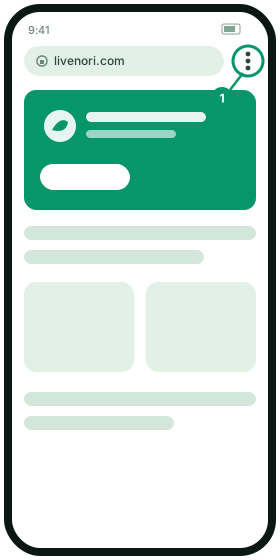
Tap the ⋮ menu in the top-right corner, next to the address bar.
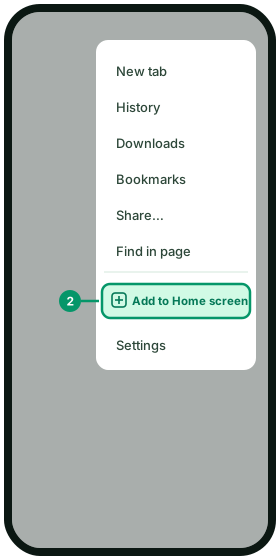
Tap Add to Home screen (on some devices it appears as Install app).
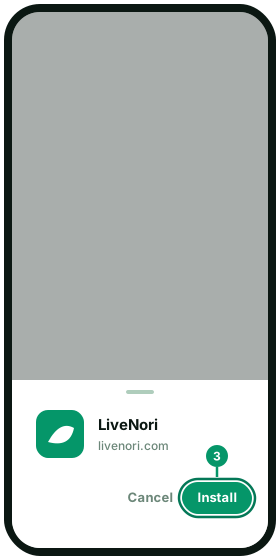
Confirm with Install / Add. The LiveNori icon appears on your home screen and opens full-screen like any other app.
1. Tap the ⋮ menu2. Add to Home screen3. Confirm Install
iPhone / iPad (Safari):
On iOS, LiveNori is available as a native app on the App Store — that’s the recommended way to use it on iPhone and iPad. If you’d still prefer the PWA, here’s how to pin it:
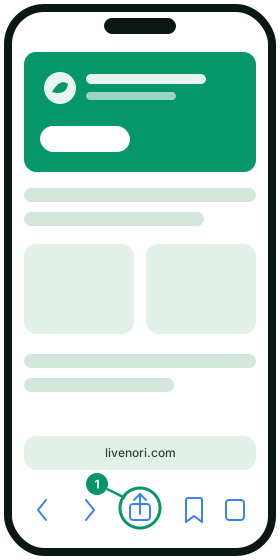
Open livenori.com in Safari (Add to Home Screen is not available from Chrome on iOS).
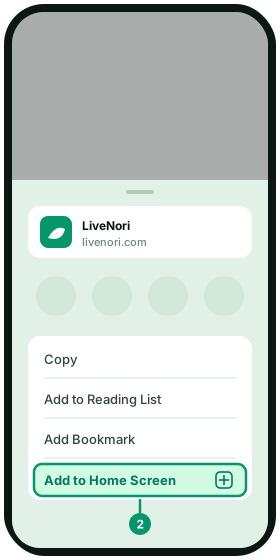
Tap the Share button — the square with an up-arrow at the bottom of the screen.
Scroll down the share sheet and tap Add to Home Screen.
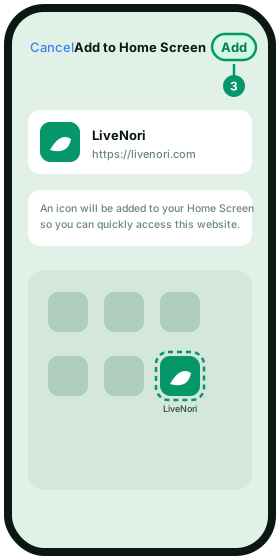
Tap Add in the top-right. The LiveNori icon will appear on your home screen.
Look for the install icon (a small monitor with a down-arrow) on the right side of the address bar, or open the browser menu and choose Install LiveNori.
Click Install. LiveNori will open in its own window and appear in your apps list / dock.
Note: installing the PWA is a free way to use LiveNori on the web — it does not by itself unlock a paid subscription. Subscriptions are billed by Apple through the iOS app today.